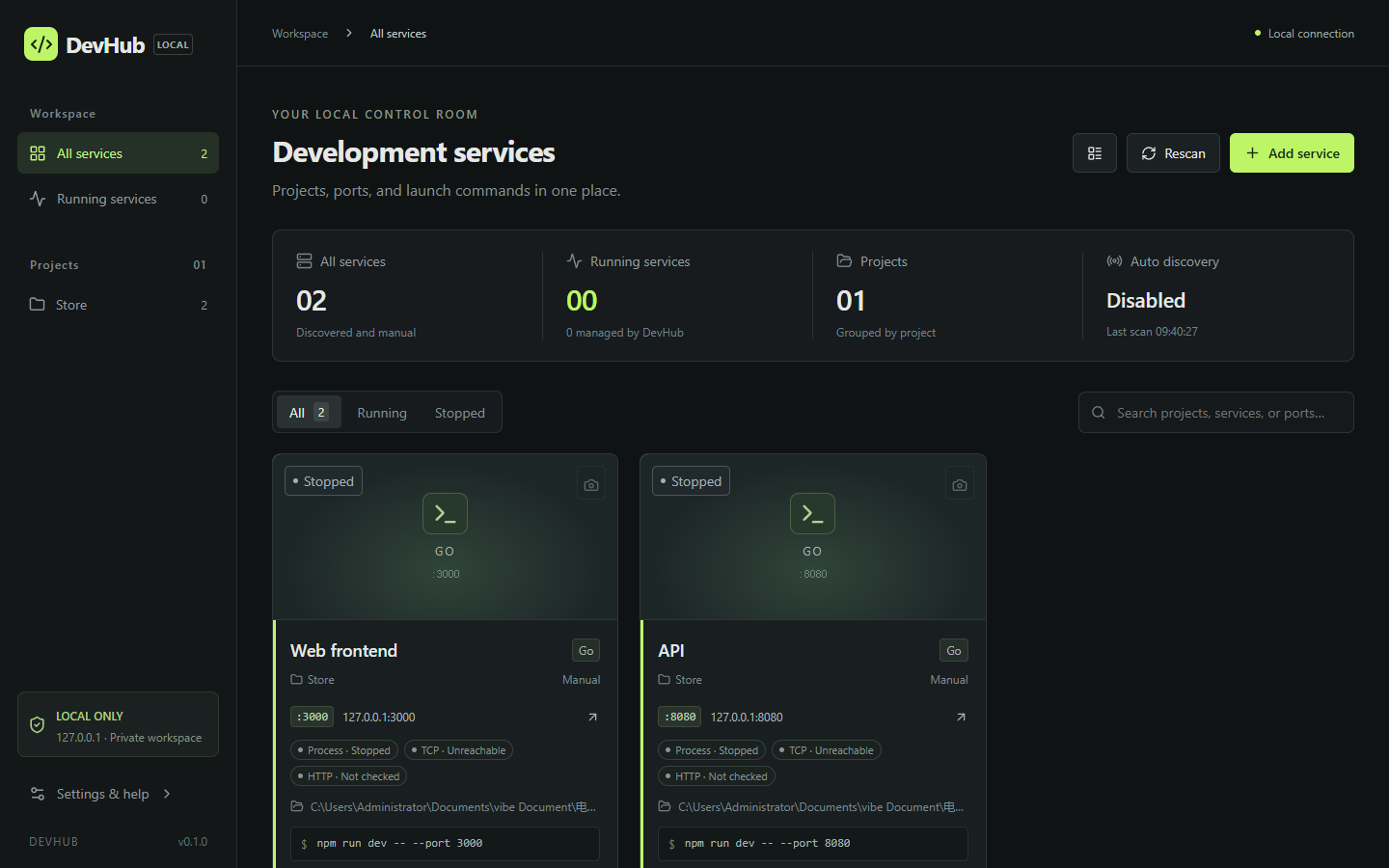
A local control room for your development services.
DevHub keeps project directories, ports, launch commands, process status, logs, and web previews in one place.
It runs entirely on 127.0.0.1: no account, no cloud, no database server. One Go binary with the UI built in.
The DevHub workbench, from the project repository's docs/screenshots/workbench.png.
Why DevHub
Three questions every developer asks about a local service
01
Which project does this port or process belong to?
02
Is it actually up, or just holding a port?
03
How do I start it again reliably next time?
DevHub answers them from one screen, without changing your projects' own config.
Features
Everything about your running dev stack, in one place
Auto-discovery
Scans the current user's TCP listeners every 10 s by default (configurable 5–300 s, or off). Identifies projects from package.json, go.mod, pyproject.toml, Cargo.toml and more. Ports of the same process are merged, and each card shows why it matched.
Project workbench
Group services by project. Search by name, framework, path, or port, and filter running or stopped. Register a frontend and a backend under the same project name to see them side by side.
Start & stop
Save a trusted local launch command; port conflicts are rejected. Paste a full terminal line like cd /path && npm run dev and DevHub splits out the project directory. PowerShell + Job Object on Windows, /bin/sh + process groups on macOS/Linux.
Layered health
Process, TCP, and HTTP status are shown separately, so you can tell "listening" from "actually responding". Start timeouts, quick exits, and failed checks show a reason and can be retried.
Clean live logs
stdout/stderr tailed with ANSI, UTF-16 and PowerShell CLIXML cleanup. Search, pause, copy, clear, and export. Keeps the last 500 chunks per service, up to 16 KiB each.
Web covers
Running HTTP services get a preview screenshot using your local Chrome, Edge, or Chromium, in a throwaway profile. Manual refresh, timeout, and retry are built in. Without a browser, service management still works.
Local persistence
Config and logs in SQLite (WAL), covers as PNG files. After a restart DevHub restores your services and re-checks processes. Saved projects are never auto-started.
Backup & import
JSON export leaves out logs, covers, and secret environment variables by default. Import backs up the current database first and won't run while managed processes are running.
Personalization
Light/dark theme, accent color, density, card or list view, per-project color, icon and order, plus keyboard shortcuts. English UI by default, with Chinese in Settings.
How it works
Up and running in a minute
1
Download or build
Grab a prebuilt binary from Releases: devhub-windows-amd64.exe, devhub-darwin-arm64, or devhub-linux-amd64, verified with SHA256SUMS.txt. A prebuilt binary needs no Go or Node.js.
2
Run it and open the workbench
Start devhub and open http://127.0.0.1:4780. Use -addr to change the port (IPv4 loopback only) and -data for a custom data directory.
3
Add services, or let discovery find them
Click Add service with a name, project path, port, and launch command, then Start. Or start a project in its own terminal and DevHub will pick it up on the next scan. Discovery only records listeners; it never starts commands by itself.
Build from source · Go 1.26+, Node.js 22.12+, npm
# clone and build
git clone https://github.com/Lcrro/DevhubX.git
cd DevhubX/web && npm ci && npm run build && cd ..
go build -o dist/devhub ./cmd/devhub
./dist/devhub
Build scripts
# Linux / macOS
sh scripts/build.sh

# Windows PowerShell
./scripts/build.ps1
./dist/devhub.exe

# custom port and data dir
devhub -addr 127.0.0.1:4780 -data /path/to/devhub-data
Security model
Loopback only, by design
DevHub is built for one trusted developer on one machine. It is not a remote orchestration platform, a multi-user permission system, or a public monitoring service.
Binds to 127.0.0.1 only
The backend refuses wildcard interfaces and remote addresses. The -addr flag only accepts IPv4 loopback.
Host, Origin & Fetch Metadata checks
Exact Host and Origin matching and rejection of cross-site Fetch Metadata guard against DNS rebinding and cross-site browser attacks. No CORS.
Per-session write token
Every state change needs a random token, regenerated on each launch, plus a JSON Content-Type.
Hardened UI
CSP, frame-ancestors, nosniff and no-referrer. The API does not allow arbitrary file reads. SQLite uses parameterized statements.
Careful process control
Stopping an external process needs your confirmation plus same-user and PID start-time checks. Managed processes are cleaned up through OS process groups or Job Objects.
Isolated screenshots
Covers use a temporary browser profile, accept loopback HTTP/HTTPS URLs only, and block non-local requests and redirects. The browser sandbox stays on.
Limits, stated plainly: launch commands run with your user's permissions, and DevHub does not sandbox malicious code.
The data directory (commands, paths, logs, screenshots) is not encrypted. Don't expose the API or the Vite dev proxy to a network,
and don't run untrusted projects as Administrator/root. Release binaries are verified with SHA-256 checksums; they are not code-signed yet.
Details: SECURITY.md.
Roadmap
Where DevHub is, and where it's going
Done
Foundation
Scope, security boundaries, SQLite storage, and acceptance rules.
Done · verified on Windows
v0.1: core workbench
Auto-discovery, project identity, start/stop, logs, web screenshots, launch-command splitting.
Done · v0.2.0 released Sep 15, 2026
v0.2: settings & quality
Settings, English/Chinese UI, layered health, log quality, discovery controls, config migration and backup, personalized UI.
Release workflow publishes Windows, macOS (arm64), and Linux (amd64) binaries with an SBOM and SHA-256 checksums.
In progress
Release hardening
Runtime verification on real macOS hardware and Linux screenshot evidence (Windows is fully verified today; CI builds and tests all three platforms),
install/upgrade testing on a clean machine, and code signing once a publisher certificate is available.
Planned · not yet shipped
AI diagnosis with Claude
When a service fails to start, exits early, or fails its health check, DevHub will be able to send the relevant log tail and status to Claude
to explain the likely cause and suggest a fix. This feature is planned and not in the codebase yet. It will be opt-in, because today DevHub never sends data off your machine.
Future candidates
Next
Project-level orchestration, WSL and Docker Compose support, tray notifications. To be evaluated after a mature release.
Open source
MIT licensed. Built in the open.
DevHub is free to use, modify, and redistribute under the MIT License. Issues and pull requests are welcome on GitHub. See
CONTRIBUTING.md.